https://modelcontextprotocol.io/introduction
MCP 协议,允许应用程序以一种统一的方式向大模型提供 Function call 函数调用。
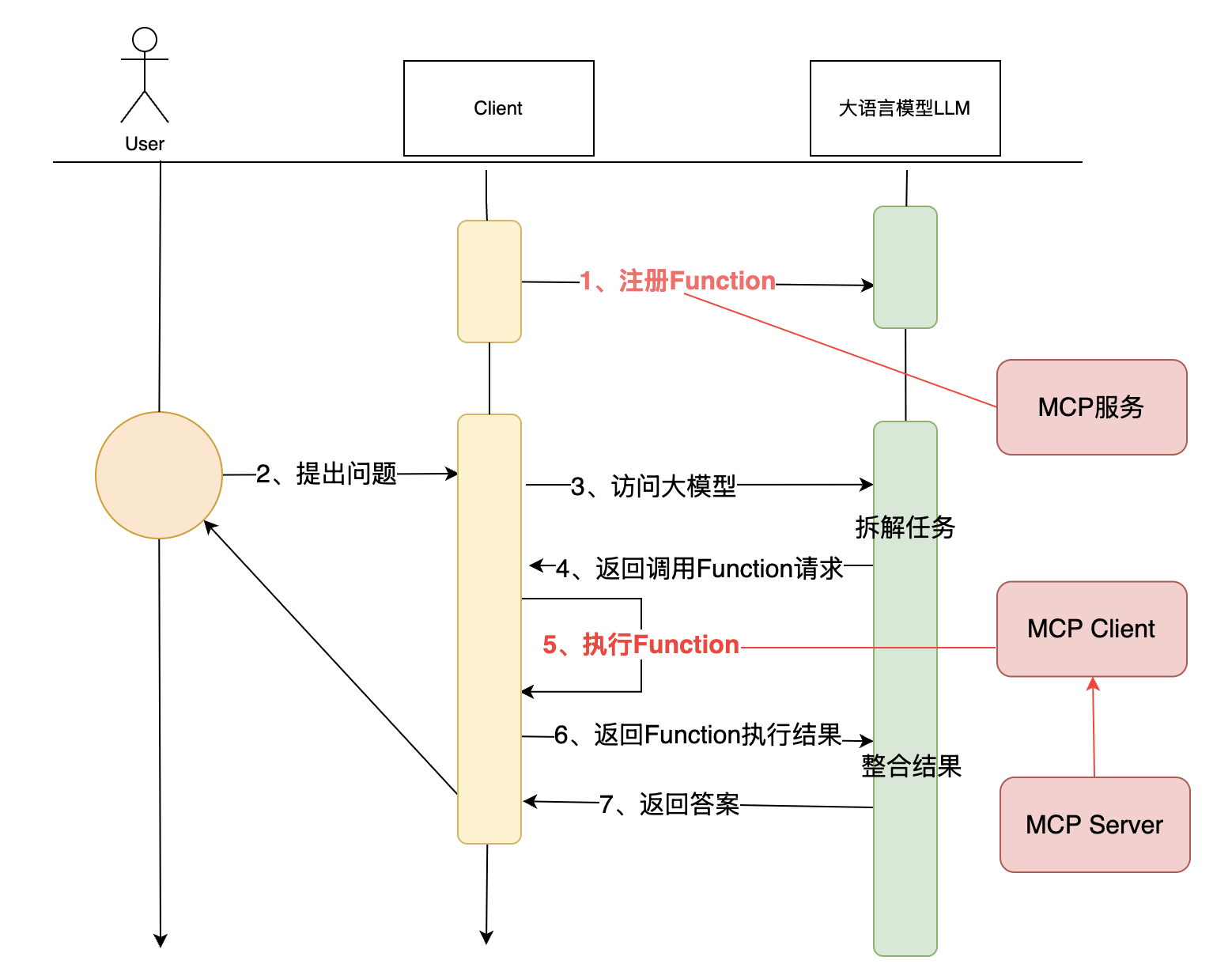
两种实现方式:
- SSE:类似与 HTTP 服务端提供服务,客户端与其建立长连接,客户端访问服务,获取服务数据。
- STDIO:客户端本地执行一个应用程序,通过应用程序获取对应结果。(服务由 MCP 的提供者设计,但执行却在客户端机器执行)
MCP 工具实现与使用
示例:
1
2
3
4
5
6
7
8
9
10
11
12
13
14
15
16
17
18
19
20
21
22
23
24
25
26
27
28
29
30
31
32
33
34
35
|
from mcp.server.fastmcp import FastMCP
mcp = FastMCP("roymcpdemo")
@mcp.tool()
def add(a: int, b: int) -> int:
"""Add two numbers together"""
print(f"roy mcp demo called: all({a}, {b})")
return a + b
@mcp.tool()
def weather(city: str):
"""获取某个城市的天气
Args:
city:具体城市
"""
return "城市" + city + "天气挺好"
@mcp.resource("greeting://{name}")
def greeting(name: str) -> str:
"""Greet a person by name."""
print(f"roy mcp demo called : greeting({name})")
return f"Hello, {name}!"
if __name__ == "__main__":
mcp.run(transport="sse")
mcp.run(transport="stdio")
|
sse 协议启动服务可在对应配置文件中添加配置使用:
1
2
3
4
|
"roymcpdemo": {
"url": "http://127.0.0.1:8000/sse",
}
|
1
2
3
4
5
6
7
8
9
10
11
12
13
14
15
16
17
18
19
20
21
22
23
24
25
26
27
28
29
30
31
32
33
34
35
36
37
38
39
40
41
42
43
44
45
46
47
48
49
50
51
52
53
54
55
56
|
from mcp import StdioServerParameters, stdio_client, ClientSession
import mcp.types as types
server_params = StdioServerParameters(
command="python",
args=["./mcp_server.py", "stdio"],
env=None
)
async def handle_sampling_message(message: types.CreateMessageRequestParams) -> types.CreateMessageResult:
print(f"sampling message: {message}")
return types.CreateMessageResult(
role="assistant",
content=types.TextContent(
type="text",
text="Hello,world! from model"
),
model="qwen-plus",
stopReason="endTurn"
)
async def run():
async with stdio_client(server_params) as (read, write):
async with ClientSession(read, write, sampling_callback=handle_sampling_message) as session:
await session.initialize()
prompts = await session.list_prompts()
print(f"prompts: {prompts}")
tools = await session.list_tools()
print(f"tools: {tools}")
resources = await session.list_resources()
print(f"resources: {resources}")
result = await session.call_tool("weather", {"city": "北京"})
print(f"result: {result}")
if __name__ == "__main__":
import asyncio
asyncio.run(run())
|
调用已有 MCP 服务回答问题
1
2
3
4
5
6
7
8
9
10
11
12
13
14
15
16
17
18
19
20
21
22
23
24
25
26
27
28
29
30
31
32
33
34
35
36
37
38
39
40
41
42
43
44
45
46
47
48
49
50
51
52
53
54
|
from langchain_mcp_adapters.client import MultiServerMCPClient
from langgraph.prebuilt import create_react_agent
from config.load_key import load_key
from langchain_community.chat_models import ChatTongyi
import asyncio
llm = ChatTongyi(
model="qwen-plus",
api_key=load_key("BAILIAN_API_KEY"),
)
client = MultiServerMCPClient(
{
"amap-maps": {
"command": "npx",
"args": [
"-y",
"@amap/amap-maps-mcp-server"
],
"env": {
"AMAP_MAPS_API_KEY": "451ad40d0e39453600f2a305e31eabe4"
},
"transport": "stdio"
}
}
)
async def main():
tools = await client.get_tools()
agent = create_react_agent(
llm,
tools,
)
response = await agent.ainvoke(
{"messages": [{"role": "user", "content": "在杭州,我要去西湖,请给我推荐一些景点"}]}
)
print(response)
asyncio.run(main())
|