XSS 补充
利用方式
事件处理程序
事件处理程序,即用户与浏览器交互后执行的某种动作,而响应某个事件的函数叫做事件处理程序(事件侦听器) 。
按照惯例,事件处理程序的名称总是以 on 开头,因此单击事件的事件处理程序称为 onclick ,加载事件的事件处理程序称为 onload ,模糊事件的事件处理程序称为 onblur 等。
常见的事件处理程序
| 事件处理程序 |
HTML标记 |
触发时机 |
| onAbort |
<img> |
图像加载过程给中断了时触发 |
| onBlur |
<body>和窗体元素 |
窗体和窗体元素在失去键盘焦点时触发 |
| onChange |
窗体元素 |
用户修改了窗体元素的值后触发 |
| onClick |
所有元素 |
用户单击了类似按钮这样的窗体元素后 触发 |
| onError |
<img> |
加载图像过程中发生错误时触发 |
| onFocus |
<body> |
窗体或窗体元素得到键盘焦点时触发 |
| onLoad |
<body><img><object> |
文档、图像或对象完成加载时触发 |
| onMouseOut |
所有元素 |
鼠标指针离开对象时触发 |
| onMouseOver |
所有元素 |
鼠标指针移过对象时触发 |
| onSubmit |
<form> |
用户提交窗体时触发 |
| onUnLoad |
<body><frameset> |
卸载文档时触发 |
文件类型触发 XSS
常配合钓鱼来实现;
SVG(Scalable Vector Graphics)一种基于XML的二维矢量图格式,该图像在改变尺寸的情况下图像质量不会有所损失。
可通过向其中插入 JS 代码来实现 XSS;
1
2
3
4
| <svg xmlns="http://www.w3.org/2000/svg" version="1.1">
<circle cx="100" cy="50" r="40" stroke="black" stroke-width="2" fill="red" />
<script>alert(1)</script>
</svg>
|
向 PDF 中添加“动作”,添加 JS 代码;
一些需要用到 Adobe Flash 的网页动画之类的网页,可能存在该文件的 XSS 漏洞;
示例:利用 Adobe Flash Professional CS6 工具制作含有 XSS 漏洞的 SWF 文件作为示例;
在代码区域属性发布设置解析:
1
2
3
4
5
|
var m=_root.m;
flash.external.ExternalInterface.call(m);
|
在访问含有该文件的网页时,给予参数?m=alert(/xss/)即可触发;
该文件 XSS 漏洞的测试思路:
- 反编译 swf 文件;
- 查找触发危险函数;
常见的可触发xss的危险函数有:getURL,navigateToURL,ExternalInterface.call,htmlText,loadMovie 等等;
- 寻找可控参数访问触发;
网页功能触发 XSS
PostMessage XSS
场景:两个网页直接进行通信,一个网页接收之前另一个网页的 API 参数来显示当前网页的一些功能;
此时若当需要接收的参数处理不当,则会导致 XSS;
eg:
1
2
3
4
5
6
7
| // 网页1:
<script>
window.addEventListener("message", (event) => {
location.href = `${event.data.url}`;
});
</script>
|
该页面的事件存在可控的 URL,通过构造攻击网页来向该页面传入可控参数实现 XSS 攻击效果;
1
2
3
4
5
6
7
8
9
10
11
12
13
14
15
|
<script>
function openChild() {
child = window.open('xssreceive.html', 'popup', 'height=300px, width=300px');
}
function sendMessage() {
let msg = { url: "javascript:alert('yesgay')" };
child.postMessage(msg, '*');
}
</script>
<input type='button' id='btnopen' value='打开子窗口' onclick='openChild();' />
<input type='button' id='btnSendMsg' value='发送消息' onclick='sendMessage();' />
|
案例: https://mp.weixin.qq.com/s/M5YIkJEoHZK6_I7nK6aj5w
localStorage 型 xss
即存储型 XSS ,不过是存储在当前浏览器上;
一些 Web 应用使用 localStorage 在用户浏览器中存储数据键值对,这些数据可以在浏览器关闭后仍然保留,并且在同一域名下的不同页面之间共享。当应用程序从 localStorage 中读取数据并将其显示在页面上时,如果没有对数据进行充分的验证和过滤,攻击者就有可能通过修改localStorage 中的数据来注入恶意脚本实现 XSS 。
测试点:
- 黑盒:寻找输入点(如表单、搜索框、评论区等),构造测试用例在页面中调用;
- 白盒:查找与 localStorage 相关的代码段分析数据存储及数据读取;
挖掘:查看目标应用 localStorage;寻找可控键值对;寻找该键值对输出点;
第三方库&框架等因素所触发 XSS
主要由第三方库、框架、浏览器及其插件部分版本所存在的一些 XSS 漏洞;
一些示例:测试<img src="x" onerror="alert('XSS')" />;
file:App.vue:1
2
3
4
5
6
7
8
9
10
11
12
13
14
15
16
17
18
19
20
21
22
23
24
25
26
27
28
29
30
31
32
33
| <template>
<div>
<h1>XSS 漏洞演示</h1>
<input v-model="userInput" placeholder="输入你的内容" />
<button @click="showContent">显示内容</button>
<div v-html="displayContent"></div>
</div>
</template>
<script>
export default {
data() {
return {
userInput: '', // 用户输入
displayContent: '' // 显示的内容
};
},
methods: {
showContent() {
// 直接将用户输入的内容渲染到页面
this.displayContent = this.userInput;
}
}
};
</script>
<style>
#app {
font-family: Avenir, Helvetica, Arial, sans-serif;
text-align: center;
margin-top: 60px;
}
</style>
|
在第 6 行,使用 文本插值{{}}代替 v-html 即可避免;
file:App.js1
2
3
4
5
6
7
8
9
10
11
12
13
14
15
16
17
18
19
20
21
22
23
24
25
| import React, { useState } from 'react';
import ReactDOM from 'react-dom';
function App() {
const [userInput, setUserInput] = useState('');
const [displayedInput, setDisplayedInput] = useState('');
const handleInputChange = (e) => {
setUserInput(e.target.value);
};
const displayInput = () => {
setDisplayedInput(userInput);
};
return (
<div>
<input type="text" value={userInput} onChange={handleInputChange} placeholder="输入内容" />
<button onClick={displayInput}>显示输入</button>
<div dangerouslySetInnerHTML={{__html: displayedInput}}/>
{/*<div>{displayedInput}</div>*/}
</div>
);
}
export default App;
|
第 20 行,直接使用 {displayedInput}来显示则可避免;
file:main.js1
2
3
4
5
6
7
8
9
10
11
12
13
14
15
16
17
18
19
20
21
22
23
24
25
26
27
| const { app, BrowserWindow } = require('electron');
const path = require('path');
function createWindow() {
const win = new BrowserWindow({
width: 800,
height: 600,
webPreferences: {
nodeIntegration: true,
contextIsolation: false
}
});
win.loadFile('index.html');
}
app.whenReady().then(() => {
createWindow();
app.on('activate', function () {
if (BrowserWindow.getAllWindows().length === 0) createWindow();
});
});
app.on('window-all-closed', function () {
if (process.platform !== 'darwin') app.quit();
});
|
file:index.html1
2
3
4
5
6
7
8
9
10
11
12
13
14
15
16
17
18
19
20
21
22
| <!DOCTYPE html>
<html>
<head>
<meta charset="UTF-8">
<title>Electron XSS Example</title>
</head>
<body>
<input type="text" id="userInput" placeholder="输入内容">
<button onclick="displayInput()">显示输入</button>
<div id="displayArea"></div>
<script>
function displayInput() {
const input = document.getElementById('userInput').value;
const displayArea = document.getElementById('displayArea');
displayArea.innerHTML = input;
}
</script>
</body>
</html>
|
file:package.json1
2
3
4
5
6
7
8
9
10
11
12
13
14
15
16
| package.json
{
"name": "electron-xss-example",
"version": "1.0.0",
"description": "",
"main": "main.js",
"scripts": {
"start": "electron ."
},
"keywords": [],
"author": "",
"license": "ISC",
"devDependencies": {
"electron": "^23.2.1"
}
}
|
第 17 行,使用 textContent 代替 innerHTML 来显示文本即可避免;
参考学习:
水洞: https://mp.weixin.qq.com/s/FsFvQlVrb_J4wsyE8gpprA
介绍: https://mp.weixin.qq.com/s/EMsK1c901-bDYapvHxs-VQ
工具:
https://github.com/mahp/jQuery-with-XSS
https://github.com/honeyb33z/cve-2020-11023-scanner
MXSS
变异的 XSS;
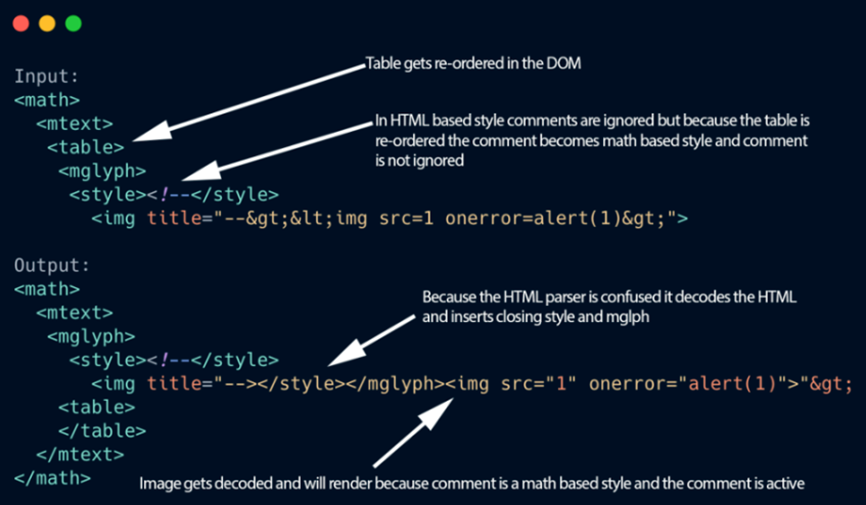
场景:
原本的 XSS Payload 被过滤,但是已经存储在当前网站;当别的网站通过其他方式来解析该网站时,如一些特殊原因,eg:反编码等;(如存在预览当前网页的一个功能);此时又触发了原本网站被过滤掉的 XSS Payload;
【各种端到端之间没有形成一种特定统一的处理方式】
Burpsuite 靶场模拟复现: https://portswigger-labs.net/mxss/
参考学习:
https://mp.weixin.qq.com/s/31zaBzZ1e6rNobYCrn7Qhg
https://www.fooying.com/the-art-of-xss-1-introduction/
UXSS:Universal Cross-Site Scripting
UXSS 利用浏览器或者浏览器扩展漏洞来制造产生 XSS 并执行代码的攻击类型。
eg:
MICROSOFT EDGE uXSS CVE-2021-34506;Edge 浏览器翻译功能导致 JS 语句被调用执行;
(在当前浏览器上 登录 Facebook 并用其搜索 XSS Payload 正常过滤,无法触发,但当用该浏览器的翻译功能时导致 Payload 触发。(浏览器底层的解析问题所导致的吧~))
参考学习:
https://www.bilibili.com/video/BV1fX4y1c7rX
https://mp.weixin.qq.com/s/rR2feGeuRt3hOFPkV3_6Ow
一般对于这些前端框架是很难挖掘到它们的漏洞,一般只有在一些特定的条件下才会存在该漏洞。