学习文档:
JS 基础 Ajax Ajax 主要作用:
数据交换,通过 Ajax 可给服务器发送请求,并获取服务器响应的数据;
后台发送:浏览器的请求是后台js发送给服务器的,js会创建单独的线程发送异步请求,这个线程不会影响浏览器的线程运行;
局部刷新:浏览器接收到结果以后进行页面局部刷新
JS 使用外部库都需要先进行远程或本地加载
基本编写示例:
1 2 3 4 5 6 7 8 9 10 11 12 13 14 <script type="text/javascript" > var xhttp = new XMLHttpRequest (); xhttp.open ("GET" , "1.txt" , true ); xhttp.send (); xhttp.onreadystatechange = function ( if (xhttp.readyState == 4 && xhttp.status == 200 ){ console .log (xhttp.responseText ); } } </script>
1 2 3 4 5 6 7 8 9 10 11 12 13 14 15 <!-- 引入 jQuery 库文件 --> <script src ="https://code.jquery.com/jquery-3.7.1.js" > </script > <script src ="jquery-3.7.1.min.js" > </script > <script > $.ajax ({ method : "GET" , url :"1.txt" , dataType : "text" , success : function (response ){ console .log (response); } }); </script >
1 2 3 4 5 6 7 8 9 10 11 12 13 14 15 16 17 18 19 <!-- 引入 axios 库文件 --> <script src ="https://cdn.jsdelivr.net/npm/axios/dist/axios.min.js" > </script > <script src ="axios.min.js" > </script > <script > axios ({ method : 'GET' , url : '1.txt' , }).then (function (response ) { console .log (response.data ); }) axios.get ('1.txt' ).then (function (response ) { console .log (response.data ); }) </script >
1
2
3
4
5
6
7
8
9
10
11
12
13
14
15
16
17
18
19
20
21
22
23
24
25
26
27
28
29
30
31
32
33
34
35
36
37
38
<form action="file.php" method="post" enctype="multipart/form-data" > 选择文件:<input type="file" name="file_upload" onchange="checkFile(this.value)" > <input type ="submit" value ="上传" > </form > <script src ="jquery-3.7.1.min.js" > </script > <script > function checkFile (filename ) { var exts = ['png' , 'jpg' , 'jpeg' , 'gif' , 'bmp' , 'mpeg' ]; var index = filename.lastIndexOf ("." ); var ext = filename.substr (index + 1 ); var isValid = false ; for (var i = 0 ; i < exts.length ; i++) { if (ext.toLowerCase () == exts[i].toLowerCase ()) { isValid = true ; break ; } } if (isValid) { alert ('文件正确!' ); } else { alert ('非法文件!' ); window .location .replace ("file.html" ); } } </script >
基本操作就是 JS 绑定某个 HTML 标签或标签属性内容,点击从而触发事件。
DOM
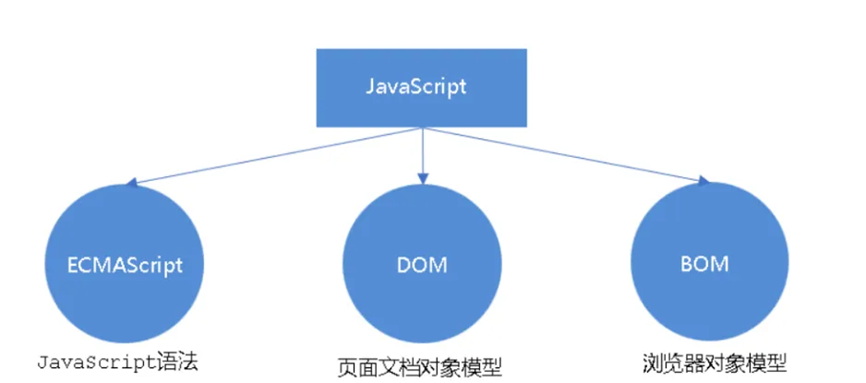
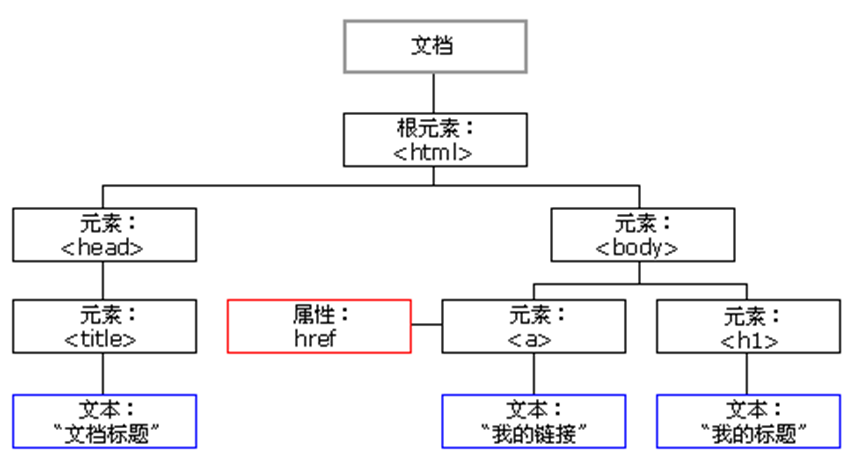
DOM (Document Object Model)文档对象模型:
访问文档:可以动态获取和修改页面上的内容
修改文档结构:可以添加、删除、移动或替换元素
处理事件:为页面元素绑定和响应交互事件(如点击、悬停等)
1
2
3
4
5
6
7
8
9
10
11
12
13
14
15
16
17
18
19
20
21
22
23
24
25
26
27
28
29
30
31
<!-- 通过ID 获取元素并设置href属性 --> <a id ="a" > 点我</a > <script type ="text/javascript" > var a=document .getElementById ("a" ); a.setAttribute ("href" ,"http://www.baidu.com" ); </script > <!-- 使用HTML 属性绑定事件 --> <button onclick ="func()" > 点我</button > <script > function func ( alert ("1" ); } </script > <!-- 按钮元素,通过ID "bn" 进行标识 --> <button id ="bn" > 点我</button > <script > var bn=document .getElementById ("bn" ); bn.onclick =function ( alert ("xxx" ); } </script >
案例:
https://xz.aliyun.com/news/11945
https://mp.weixin.qq.com/s/iUlMYdBiOrI8L6Gg2ueqLg
BOM BOM (Browser Object Model) 浏览器对象模型:
使用 Window 对象对浏览器打开关闭返回新建进行操作。
使用 Screen 对象窗口的 screen 属性包含有关客户端显示屏的信息。
使用 Navigator 对象指浏览器对象,包含浏览器的信息。
使用 Location 对象 Location 对象包含有关当前 URL 的信息
使用 History 对象包含用户访问过的 URL,经常使用于页面跳转。
使用 Document 对象指文档对象,既属于 BOM 对象,也属于 DOM 对象。
1
2
3
4
5
6
7
8
9
10
11
12
13
14
15
16
17
18
19
20
21
22
23
24
25
26
27
28
29
30
31
32
33
<script> window .open ("http://www.baidu.com" ); console .log (screen.height ); console .log (screen.width ); console .log (screen); console .log (location); console .log (location.host ); console .log (location.hostname ); console .log (location.protocol ); console .log (location.port ); console .log (location.pathname ); console .log (navigator); console .log (navigator.appName ); console .log (navigator.appVersion ); console .log (navigator.userAgent ); history.back (); history.forward (); console .log (window .document .getElementById ); </script>
前端 JS 加密
客户端发送->明文数据传输-服务端接受数据->处理数据
明文加密->客户端发送->密文数据传输-服务端接受数据->解密数据->处理数据
1
2
3
4
5
6
7
8
9
10
11
12
13
14
15
16
17
18
19
20
21
22
23
24
25
26
27
28
29
30
31
32
33
34
35
36
37
38
39
40
41
42
43
44
45
46
47
48
49
<div class ="login" > <h2 > 后台登录</h2 > <label for ="username" > 用户名:</label > <input type ="text" name ="username" id ="username" class ="user" > <label for ="password" > 密码:</label > <input type ="password" name ="password" id ="password" class ="pass" > <button > 登录</button > </div > <script src ="jquery.js" > </script > <script src ="crypto-js.js" > </script > <script > $("button" ).click (function ( var passstr = $('.pass' ).val (); var aseKey = "aeskey" var aespassstr = CryptoJS .AES .encrypt ( passstr, CryptoJS .enc .Utf8 .parse (aseKey), { mode : CryptoJS .mode .ECB , padding : CryptoJS .pad .Pkcs7 } ).toString (); $.ajax ({ type : 'POST' , url : 'login.php' , data : { username : $('.user' ).val (), password : aespassstr }, dataType : 'json' , success : function (data ) { console .log (data); if (data['infoCode' ] == 1 ) { alert ('登录成功!' ); } else { alert ('登录失败!' ); } } }); }); </script >
前端加密库 Crypto https://github.com/brix/crypto-js
https://juejin.cn/post/7382893339181613068
前端加密库 jsencrypt https://github.com/travist/jsencrypt
https://www.cnblogs.com/Lrn14616/p/10154529.html
文件上传、登录验证等操作,若通过 JS 验证,攻击者通过对过滤代码的分析,或禁用 JS 或修改返回分析绕过从而导致安全问题。
NodeJS
https://www.runoob.com/nodejs/nodejs-tutorial.html
常用第三方库
express:一个简洁而灵活的 node.js Web应用框架
body-parser:node.js中间件,用于处理 JSON, Raw, Text 和 UR L编码的数据
cookie-parser:一个解析 Cookie 的工具。通过 req.cookies 可以取到传过来的 cookie,并把它们转成对象
multer:node.js中间件,用于处理 enctype=”multipart/form-data”(设置表单的 MIME 编码)的表单数据
mysql:Node.js 来连接 MySQL 专用库,并对数据库进行操作
…
代码示例及可能存在漏洞解析
1 2 3 4 5 6 7 8 9 10 11 12 13 14 15 16 17 18 19 20 21 22 23 24 25 26 27 28 29 30 31 32 33 34 35 36 37 38 39 40 41 var mysql = require ('mysql' ); var express = require ('express' ); var app = express (); var connection = mysql.createConnection ({ host : 'localhost' , user : 'root' , password : '123456' , database : 'phpstudy' }); connection.connect (); app.get ("/sql" , function (req, res ) { const id = req.query .id ; const sql = 'select * from admin where id=' + id; connection.query (sql, function (err, result ) { if (err) { console .log ('[SELECT ERROR] - ' , err.message ); return ; } console .log (result); res.send (result); }); }) var server = app.listen (8082 , '127.0.0.1' , function ( var host = server.address ().address ; var port = server.address ().port ; console .log ("应用实例,访问地址为 http://%s:%s" , host, port); })
1 2 3 4 5 6 7 8 9 10 11 12 13 14 15 16 17 18 19 20 21 22 23 24 25 26 27 28 29 const child_process = require ('child_process' ); var express = require ('express' ); var app = express (); const shell = require ('shelljs' ); shell.exec ('calc' ) app.get ('/rce' , function (req, res ) { const cmd = req.query .cmd ; child_process.exec (cmd); }) var server = app.listen (8081 , '127.0.0.1' , function ( var host = server.address ().address ; var port = server.address ().port ; console .log ("应用实例,访问地址为 http://%s:%s" , host, port); })
1 2 3 4 5 6 7 8 9 10 11 12 13 14 15 16 17 18 19 20 21 22 23 24 25 26 27 28 29 30 31 32 33 34 35 36 37 38 var fs = require ("fs" ); var express = require ('express' ); var app = express (); app.get ("/file" , function (req, res ) { var name = req.query .file ; fs.readFile (name, 'utf8' , function (err, data ) { if (err) throw err; console .log (data); res.send (data); }) }) app.post ("/dir" , function (req,res ) { var name = req.query .dir ; fs.readdir (name, 'utf8' , function (err, data ) { if (err) throw err; console .log (data); res.send (data); }) }) var server = app.listen (8081 , '127.0.0.1' , function ( var host = server.address ().address ; var port = server.address ().port ; console .log ("应用实例,访问地址为 http://%s:%s" , host, port); })
1 2 3 4 5 6 7 8 9 10 11 12 13 14 15 16 17 18 19 20 21 22 let foo = {bar : 1 }console .log (foo.bar )foo.__proto__ .bar = 'require(\'child_process\').execSync(\'calc/\');' console .log (foo.bar )let zoo = {}console .log (eval (zoo.bar ))
案例:
https://f1veseven.github.io/2022/04/03/ctf-nodejs-zhi-yi-xie-xiao-zhi-shi/
https://mp.weixin.qq.com/s/mKOlTQclji-oEB5x_bMEMg
Webpack
https://docschina.org/
https://www.webpackjs.com/
https://mp.weixin.qq.com/s/J3bpy-SsCnQ1lBov1L98WA
模块打包工具,主要用于将 JS 代码和其他资源(eg:CSS、图片、字体等)打包成浏览器可高效加载的文件。
可将多个文件(模块)打包成一个或多个最终的输出文件,管理复杂应用程序,性能优化,缓存优化
可通过配置文件来自定义配置打包的方式 webpack.config.js
1
2
3
4
# 基本安装使用 npm i webpack --dev npm i webpack-cli --dev
存在安全问题:源码泄露(若打包未进行正确的配置),攻击者可在网页上获取的 webpack:// js 目录 或 ...js.map 文件,并通过工具将其还原出来。
production(生产),development(开发),开发模式下会存在泄漏
2、devtool配置
参数 devtool 配置不当,会在部署代码文件中生成对应匹配的 soucemap 文件(源码映射),如果将参数 devtool 配置为“source-map”、“cheap-source-map”、“hidden-source-map”、“nosources-source-map”、“cheap-module-source-map”等值时,打包后将生成单独的 map 文件。
https://mp.weixin.qq.com/s/tLjSb5cinXawMEC7RfJEJQ
1
2
3
4
5
6
# shuji 可还原map文件 npm install --global shuji shuji xxx.js.map -o xxxxxxx npm install --global reverse-sourcemap reverse-sourcemap --output-dir ./ xxx.js.map
Vue
https://cn.vuejs.org/
创建 vue:npm create vue@latest
vite 创建:npm create vite@latest
cd <your-project-name>
安装依赖:npm install
开发启动:npm run dev
打包构建:npm run build
Vue 漏洞几乎没有,
1
2
3
4
5
6
7
8
9
10
11
12
13
14
15
16
17
18
19
20
21
22
23
24
25
26
27
28
29
<template> <div > <h1 > XSS 漏洞演示</h1 > <input v-model ="userInput" placeholder ="输入你的内容" /> <button @click ="showContent" > 显示内容</button > <div v-html ="displayContent" > </div > </div > </template> <script > export default { data ( return { userInput : '' , displayContent : '' }; }, methods : { showContent ( this .displayContent = this .userInput ; } } }; </script > ...
官方报告漏洞: https://cn.vuejs.org/guide/best-practices/security
案例:
https://mp.weixin.qq.com/s/30XIDREyo0Ose4v8Aa9g2w
https://mp.weixin.qq.com/s/4KgOZcWUnvor_GfxsMlInA
微信小程序 [[../../信息收集/信息收集问题#^7ec163|微信小程序]]
案例:
https://mp.weixin.qq.com/s/z28ppqhNJnLVWSScMEqiuw
https://mp.weixin.qq.com/s/ZfovaAyipqzUIYdL9objPA
https://mp.weixin.qq.com/s/PK1NhvdrDr3XWEliuyEiig